 Dupey Consulting
Field note
Kolton Dupey5 min read
From Click to CRM - Automating Lead Flow from WhatConverts to Salesforce with AI-Powered Precision
CRM · automation
Quick summary
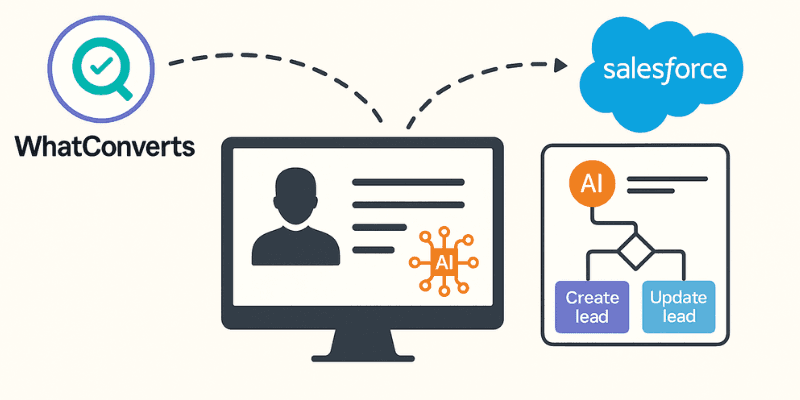
Discover how to build an intelligent automation system that captures leads from WhatConverts and seamlessly integrates them into Salesforce with AI-enhanced data processing using Zapier.
The problem
WhatConverts leads are messy and unstructured. The firm needed Salesforce Leads/Contacts created or updated, correct office assignment, and intent parsed from free-text - without manual CRM cleanup.
The fix
A Zapier automation with branching paths, Formatter logic, and AI steps so leads are classified, deduped, routed, and written to Salesforce in seconds.
🔗 Tools Involved
- WhatConverts – Lead tracking for Google & Facebook Ads
- Zapier – Automation platform to tie it all together
- Salesforce – Our CRM
- AI by Zapier – To extract and interpret key details from lead messages
- Formatter & Paths by Zapier – For logic and branching
🧠 The Challenge
- Automatically create or update the right Salesforce Lead or Contact
- Assign the lead to the correct office location and/or owner
- Parse messy input messages to extract intent and preferences
- Reduce manual CRM cleanup and assignment
🧩 The Solution
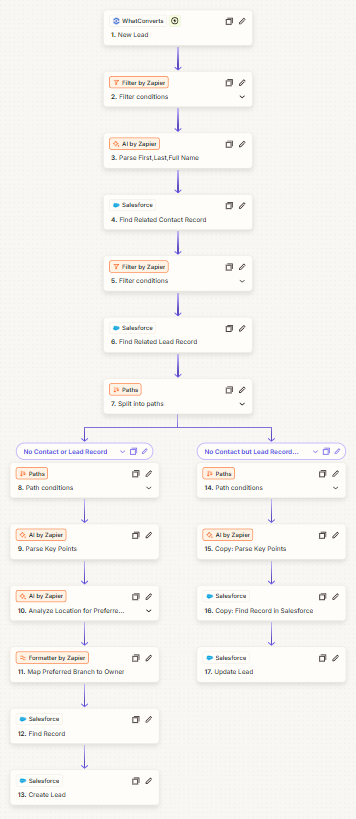
1. Trigger: New Lead in WhatConverts
2. AI by Zapier: Parse Full Name
3–6. Salesforce Lookups: Match Existing Contacts or Leads
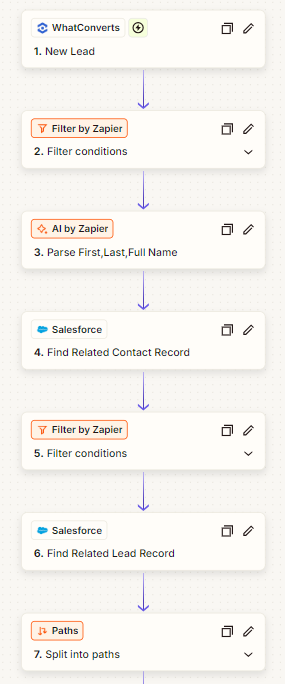
7. Paths: Logic Branching Based on Matching Records
- Path A: No Contact or Lead found → create new Lead
- Path B: Lead exists but no Contact → update existing Lead
🌎 Path A – New Lead Creation
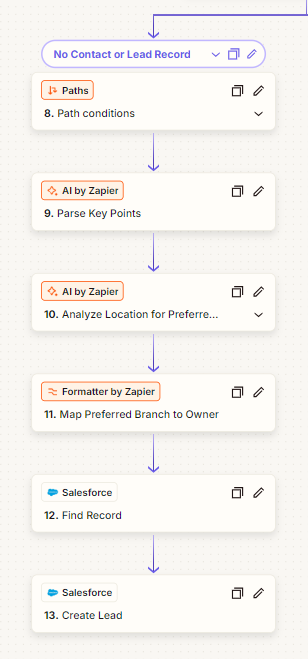
8–9. AI by Zapier: Parse Key Points & Analyze Location
10. Formatter: Assign the Lead to an Office Location
11–13. Salesforce: Create the Lead
- Parsed name
- Key insights
- Lead owner (from the zip-to-branch mapping)
- Ad source info (from WhatConverts)
🔁 Path B – Update Existing Lead
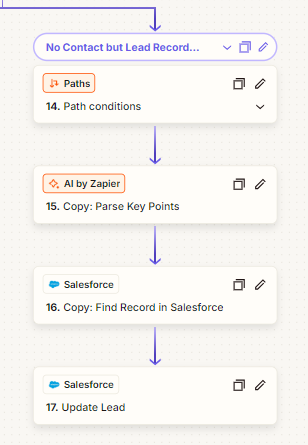
14–15. AI Parsing + Record Matching
💡 Why Use AI Here?
- Extract client preferences (e.g. "prefers morning calls")
- Pull key context like "interested in retirement planning"
- Interpret vague form inputs into structured Salesforce data
🚀 Impact
Related services
If you need this kind of work for your business, these are the closest scoped service pages.
Related project field notes
More field notes

Automating Lead Capture from WiserAdvisor with Python + Selenium
In the world of financial lead generation, speed matters. Learn how I built a Python automation script that captures leads from WiserAdvisor and sends them to Salesforce CRM, running 24/7 on a Raspberry Pi.
8 min read · 2025-07-04
Read field note →
Automating Planswell Lead Capture: From API to CRM in Minutes
Learn how we streamlined our lead capture process from Planswell using their GraphQL API to automatically route leads to our CRM, saving hours of manual work while improving response times.
4 min read · 2025-07-02
Read field note →
Google Maps Lead Generation: Automate Business Discovery with n8n (Step-by-Step Guide)
This workflow searches Google Maps for businesses in your niche, resolves each listing to its website, scrapes the site with polite rate-limits, extracts valid emails + company info, de-duplicates, and appends the results to Google Sheets-perfect for outbound campaigns.
7 min read · 2025-08-31
Read field note →Running into something similar?
This note is from a real constraint and a real project. If you are dealing with something adjacent, send a message or book a short call - I will give you a straight answer on scope and fit.